November 10 & 11, 2026 · Montréal
Welcome to the exhibitor page for MIGS26, happening on November 10 & 11, 2026 in Montreal! This guide compiles all the essential logistical details, deadlines, and resources you need to ensure a successful activation.
This page will be updated periodically with the latest updates and announcements, so be sure to bookmark it.
Oct 20
Booth artwork due
Nov 9
Move-in & setup
Nov 10–11
Show days
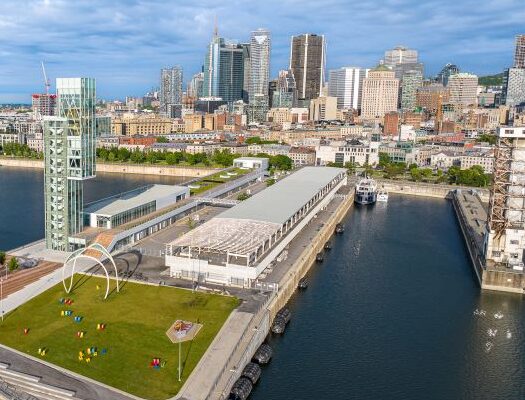
📍 Venue details
Terminal 1 and Pavilion
Address:
200 rue de la Commune Ouest
Montréal, Québec H2Y 4B2
To manage your booth and provide your specifications, please use the following links.
Services & shipping
Access services, additional furnishings, and log shipping on the GES Exhibitor Services Portal.
GES regular pricing ends: Oct 23
All exhibitors & sponsors
Provide your onsite contacts, social media handles, and technical details.
Deadline: Oct 16
Indie Pod exhibitors
For Indie Pod exhibitors, please complete your specific intake form.
Please add these important milestones to your calendar.
Now
Review GES Expresso Portal
Oct 7 – Nov 3
Advance shipment window
Oct 16
Submit exhibitor info form
Oct 20
Submit booth artwork (by 5:00 PM ET)
Oct 21
Itineraries & floorplans available
Oct 23
GES regular pricing ends
Nov 9
Move-in & onsite setup
Monday, Nov 9
3:00 PM – 9:00 PM
Tuesday, Nov 10
7:00 AM – 8:00 AM
Light materials only.
Nov 10 & 11
Day 1 · Tuesday
8:00 AM – 5:00 PM
Day 2 · Wednesday
8:30 AM – 5:00 PM
Wednesday, Nov 11
5:00 PM – 9:00 PM
All stands must be cleared by 9:00 PM.
Artwork deadline: October 20, 2026 by 5:00 PM ET.
1m x 1m
Inclusions: Installation & removal, 1x structure (8’ high) with integrated 1m counter, 1x stool, 1x arm light, basic power, and high-speed WiFi.
Optional: 40” wall-mounted TV ($440).
Graphic A (1x panel): 38.125” (w) × 54.125” (h) (requires 0.25” bleed on all sides)
Submission: Email final artwork to Julie Ouellet at jouellet@ges.com, CC Alfred Park at alfred@xpgaming.biz.
Subject: MIGS26 Indie pod graphics submission – [Your Studio Name]
10’ x 10’
Inclusions: Installation & removal, modular branded walls, 3m x 8’ fabric back wall, 1x 2m counter with 1m graphic, 2x stools, 1x 43” TV + HDMI cable, 10’ x 10’ grey carpet, basic power, and high-speed WiFi.
Graphic A (1x fabric back wall): 116.75” (w) × 91” (h) (requires 0.25” bleed on all sides)
Graphic B (1x counter): 37.5” (w) × 35.5” (h) (requires 0.25” bleed on all sides)
Submission: Email final artwork to Julie Ouellet at jouellet@ges.com, CC Alfred Park at alfred@xpgaming.biz.
Subject: MIGS26 graphics submission – [Your Company Name]
10’ x 20’
Inclusions: Installation & removal, modular branded walls with fabric back wall and white panels, 1x 2m counter with 1m graphic, 2x stools, 1x 43” TV + HDMI cable, 10’ x 20’ grey carpet, basic power, high-speed WiFi, and a lounge area (2 armchairs, 1 ottoman, 1 coffee table, 1 decorative plant).
Graphic A1 (1x wall panel half): 116.75” (w) × 54.125” (h) (requires 0.25” bleed on all sides)
Graphic A2 (1x wall panel half): 116.75” (w) × 54.125” (h) (requires 0.25” bleed on all sides)
Graphic B (1x counter): 37.5” (w) × 35.5” (h) (requires 0.25” bleed on all sides)
Submission: Email final artwork to Julie Ouellet at jouellet@ges.com, CC Alfred Park at alfred@xpgaming.biz.
Subject: MIGS26 graphics submission – [Your Company Name]
GES management: All shipping, advance receiving, and material handling are managed exclusively by GES. Find out more on the GES Expresso Portal.
No on-site storage: On-site storage of equipment is strictly prohibited at the Grand Quai (storage space is at capacity). All materials must be stored within your assigned booth footprint — no items in aisles or common areas.
Onsite handling: Exhibitors are responsible for providing their own personnel to handle deliveries. Venue and XP staff are on-site to direct vehicles and oversee logistics but cannot lift, move, or assemble items.
If you need assistance with handling or assembly, you can book labour through GES. Please refer to their Labour Services page for more info.
Mandatory: Badges are mandatory and must be worn at all times to circulate the exhibition hall (event days only).
Inclusions: Every booth footprint receives TWO (2) transferable exhibitor badges, which will be left at your booth upon your arrival on Monday, November 9.
Management: Once picked up, it is the exhibitor’s responsibility to manage and distribute these badges.
Pass assistance: For additional registration links, pass codes, or assistance, contact Shawn Pucknell at pucknell@xpgaming.biz.
Please review the GES Graphic File Submission Standards & File Transfer PDF for full details.
Vector files: PDF, EPS, or AI (saved as “High Quality Print”, “Preserve Illustrator Editing Capabilities” enabled, no printer’s marks, convert text/fonts to outlines).
Image files: TIFF, JPG, or PSD (saved as uncompressed, high-resolution).
Color profile: CMYK mode (digital 4-color process) to ensure color accuracy. Specify exact Pantone® colors if color matching is required.
Resolution: Minimum of 75 dpi/ppi at 100% output size (100+ dpi recommended for high quality).
Bleed & layout: Ensure files include appropriate bleed (standard GES file transfers require 1” bleed on all sides to prevent unexpected cropping; standard graphic panels hide the outer 0.5” in the metal channel system).
Large file submissions: Large files can be sent via the GES File Transfer Site. Enter your email address and recipient email. Under the comments section, enter your Company Name, Event Name (MIGS26), Event Location (Grand Quai), Booth Number, and other details.
Parking: On-site parking is available conveniently next to the venue at Terminal 1.
Ground-level load-in: Load-in is ground level only (there is no loading dock). Access to the main floor is through doors gates 7 & 9, facing the King Edward Basin. Please refer to the Grand Quai Pavilion Map for exact access points.
2nd floor Pavilion exhibitors: Exhibitors located on the 2nd floor of the Pavilion must load in via Door 17 and use the elevator to transport materials upstairs.
Need some ideas for your booth branding and layout? Browse photos from last year’s event.
View last year’s photos English (Canada) English (Canada)
  Français du Canada